Introduction
In my previous post, I went through how you can index documents from SharePoint in Azure AI Search and how this might benefit your agent over the built-in SharePoint integration. One key benefit that I didn’t touch on is that you can bring in additional columns from SharePoint that are not currently exposed, but you can using Azure AI Search.
I covered why this might be important in a recent blog post.
Let’s get started.
Step 1: Read my previous post
This post will assume you have already set up Azure AI Search to index your SharePoint documents. If you haven’t done that yet, please read and follow my previous post before proceeding.
Step 2: Identify the additional columns you want to index
In my example, I have added a column called “ReferenceID” to my SharePoint document library.
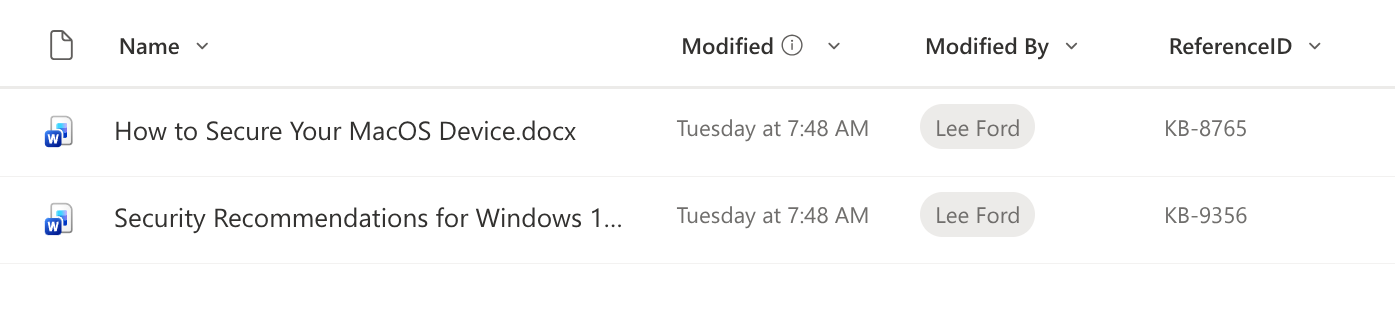
The value is a unique identifier for each document that I want to be able to query on in my agent, but is not inside the document itself, so I need to bring it in as a separate field in Azure AI Search.
Step 3: Update your data source definition
To bring in the additional column, you need to update your data source definition to include a new field for the “ReferenceID” column under the query parameter.
{
    "name": "sharepoint-datasource",
    "type": "sharepoint",
    "credentials": {
        "connectionString": "SharePointOnlineEndpoint={{SharePoint Site URL}};ApplicationId={{App Registration Client ID}};FederatedCredentialObjectId={{Managed Identity Object ID}};TenantId={{Tenant ID}};"
    },
    "container": {
        "name": "allSiteLibraries",
        "query": "additionalColumns=ReferenceID"
    }
}
Step 4: Update your index definition
To expose the new “ReferenceID” field in your index, you need to update your index definition to include a new field for “ReferenceID”. You can make this field searchable, filterable, retrievable, and sortable depending on your needs.
{
    "name": "sharepoint-index",
    "description": "SharePoint content index with vector search",
    "fields": [
        {
            "name": "uid",
            "type": "Edm.String",
            "key": true,
            "retrievable": true,
            "searchable": true,
            "analyzer": "keyword"
        },
        {
            "name": "parent_id",
            "type": "Edm.String",
            "retrievable": true,
            "searchable": false,
            "filterable": true
        },
        {
            "name": "metadata_spo_item_name",
            "type": "Edm.String",
            "retrievable": true,
            "searchable": true
        },
        {
            "name": "title",
            "type": "Edm.String",
            "retrievable": true,
            "searchable": true
        },
        {
            "name": "metadata_spo_item_path",
            "type": "Edm.String",
            "retrievable": true,
            "searchable": false
        },
        {
            "name": "metadata_spo_item_weburi",
            "type": "Edm.String",
            "retrievable": true,
            "searchable": false
        },
        {
            "name": "metadata_spo_item_content_type",
            "type": "Edm.String",
            "retrievable": true,
            "filterable": true,
            "facetable": true
        },
        {
            "name": "metadata_spo_item_last_modified",
            "type": "Edm.DateTimeOffset",
            "retrievable": true,
            "sortable": true
        },
        {
            "name": "metadata_spo_item_size",
            "type": "Edm.Int64",
            "retrievable": true
        },
        {
            "name": "ReferenceID",
            "type": "Edm.String",
            "retrievable": true,
            "searchable": true,
            "filterable": true,
            "sortable": true
        },
        {
            "name": "content",
            "type": "Edm.String",
            "retrievable": true,
            "searchable": true
        },
        {
            "name": "vectorContent",
            "type": "Collection(Edm.Single)",
            "retrievable": true,
            "searchable": true,
            "dimensions": 3072,
            "vectorSearchProfile": "sharepoint-vector-profile"
        }
    ],
    "semantic": {
        "defaultConfiguration": "sharepoint-semantic-config",
        "configurations": [
            {
                "name": "sharepoint-semantic-config",
                "prioritizedFields": {
                    "titleField": {
                        "fieldName": "metadata_spo_item_name"
                    },
                    "prioritizedContentFields": [
                        {
                            "fieldName": "content"
                        }
                    ]
                },
                "rankingOrder": "BoostedRerankerScore"
            }
        ]
    },
    "vectorSearch": {
        "profiles": [
            {
                "name": "sharepoint-vector-profile",
                "algorithm": "sharepoint-hnsw",
                "vectorizer": "sharepoint-vectorizer"
            }
        ],
        "algorithms": [
            {
                "name": "sharepoint-hnsw",
                "kind": "hnsw",
                "hnswParameters": {
                    "metric": "cosine",
                    "m": 4,
                    "efConstruction": 400,
                    "efSearch": 500
                }
            }
        ],
        "vectorizers": [
            {
                "name": "sharepoint-vectorizer",
                "kind": "azureOpenAI",
                "azureOpenAIParameters": {
                    "resourceUri": "{{OpenAI URI}}",
                    "deploymentId": "text-embedding-3-large",
                    "modelName": "text-embedding-3-large"
                }
            }
        ]
    }
}
Step 5: Update your skillset definition
Next, you need to include the “ReferenceID” field in your skillset definition to ensure that it is mapped correctly from your data source to your index.
{
    "name": "sharepoint-skillset",
    "description": "Skillset for vectorizing SharePoint content",
    "skills": [
        {
            "@odata.type": "#Microsoft.Skills.Text.SplitSkill",
            "name": "text-split-skill",
            "description": "Split content into chunks for vectorization",
            "context": "/document",
            "defaultLanguageCode": "en",
            "inputs": [
                {
                    "name": "text",
                    "source": "/document/content"
                }
            ],
            "outputs": [
                {
                    "name": "textItems",
                    "targetName": "pages"
                }
            ],
            "textSplitMode": "pages",
            "maximumPageLength": 2000,
            "pageOverlapLength": 500,
            "maximumPagesToTake": 0,
            "unit": "characters"
        },
        {
            "@odata.type": "#Microsoft.Skills.Text.AzureOpenAIEmbeddingSkill",
            "name": "embedding-skill",
            "description": "Generate embeddings using Azure OpenAI",
            "context": "/document/pages/*",
            "inputs": [
                {
                    "name": "text",
                    "source": "/document/pages/*"
                }
            ],
            "outputs": [
                {
                    "name": "embedding",
                    "targetName": "vector"
                }
            ],
            "resourceUri": "{{OpenAI URI}}",
            "deploymentId": "text-embedding-3-large",
            "dimensions": 3072,
            "modelName": "text-embedding-3-large"
        }
    ],
    "indexProjections": {
        "selectors": [
            {
                "targetIndexName": "sharepoint-index",
                "parentKeyFieldName": "parent_id",
                "sourceContext": "/document/pages/*",
                "mappings": [
                    {
                        "name": "vectorContent",
                        "source": "/document/pages/*/vector"
                    },
                    {
                        "name": "content",
                        "source": "/document/pages/*"
                    },
                    {
                        "name": "metadata_spo_item_name",
                        "source": "/document/metadata_spo_item_name"
                    },
                    {
                        "name": "title",
                        "source": "/document/metadata_spo_item_name"
                    },
                    {
                        "name": "metadata_spo_item_path",
                        "source": "/document/metadata_spo_item_path"
                    },
                    {
                        "name": "metadata_spo_item_weburi",
                        "source": "/document/metadata_spo_item_weburi"
                    },
                    {
                        "name": "metadata_spo_item_content_type",
                        "source": "/document/metadata_spo_item_content_type"
                    },
                    {
                        "name": "metadata_spo_item_last_modified",
                        "source": "/document/metadata_spo_item_last_modified"
                    },
                    {
                        "name": "metadata_spo_item_size",
                        "source": "/document/metadata_spo_item_size"
                    },
                    {
                        "name": "ReferenceID",
                        "source": "/document/ReferenceID"
                    }
                ]
            }
        ],
        "parameters": {
            "projectionMode": "skipIndexingParentDocuments"
        }
    }
}
Step 6: Run your indexer
Finally, you need to run your indexer to re-index with the new “ReferenceID” field included. Once the indexing is complete, you should see the “ReferenceID” field populated in your index for each document.
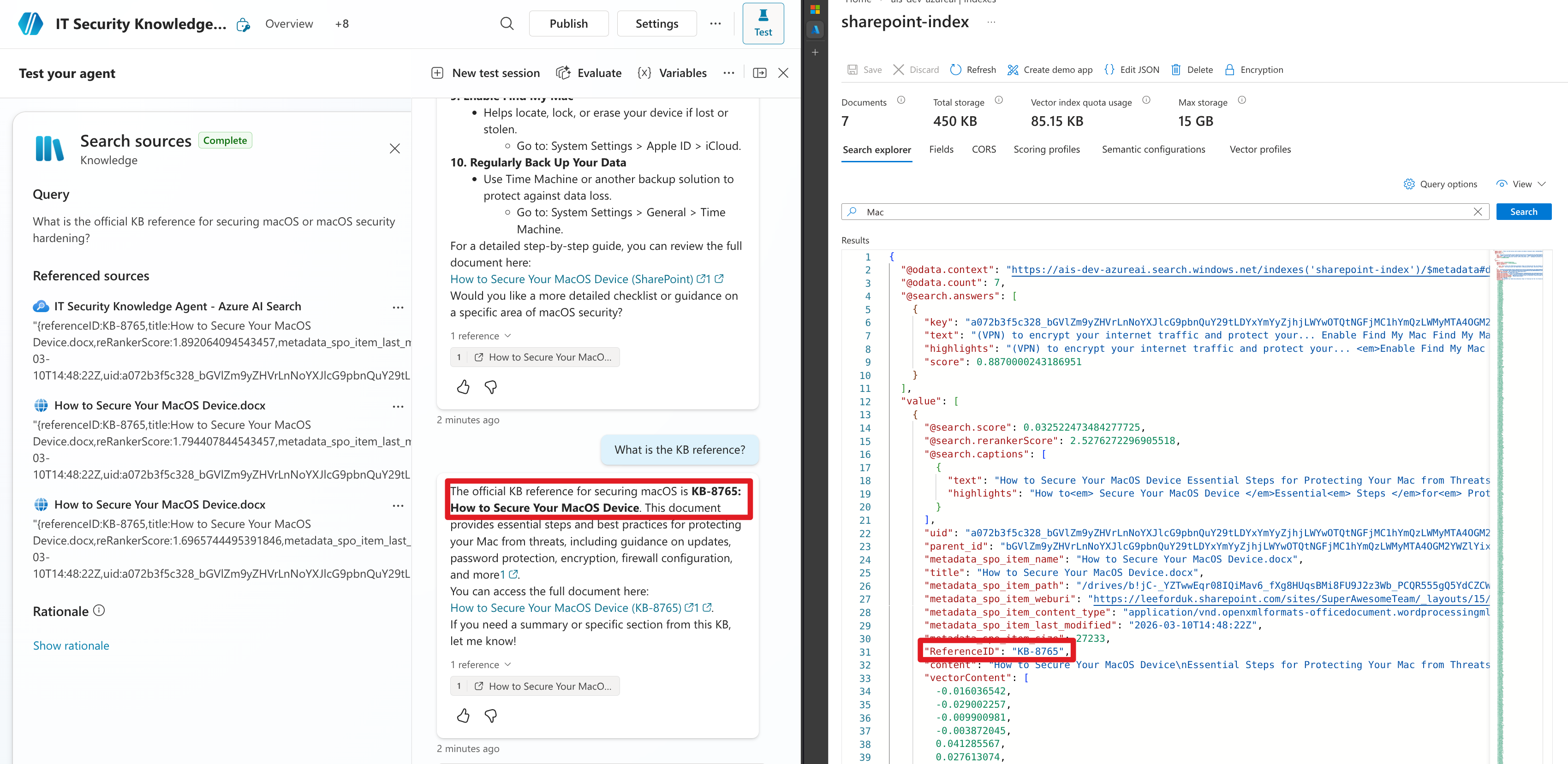
You should now see the “ReferenceID” field available in your index and you can use it in your queries to filter or retrieve documents based on this unique identifier.
